# Use conditional statements in configuration fields
This topic describes how to use Replicated template functions in the Config custom resource to conditionally show or hide configuration fields for your application on the Replicated KOTS Admin Console **Config** page.
## Overview
The `when` property in the Config custom resource denotes configuration groups or items that are displayed on the Admin Console **Config** page only when a condition evaluates to true. When the condition evaluates to false, the group or item is not displayed.
It can be useful to conditionally show or hide fields so that your users are only provided the configuration options that are relevant to them. This helps to reduce user error when configuring the application. Conditional statements in the `when` property can be used to evaluate things like the user's environment, license entitlements, and configuration choices. For example:
* The Kubernetes distribution of the cluster
* If the license includes a specific feature entitlement
* The number of users that the license permits
* If the user chooses to bring their own external database, rather than using an embedded database offered with the application
You can construct conditional statements in the `when` property using Replicated template functions. Replicated template functions are a set of custom template functions based on the Go text/template library. For more information, see [About Replicated Template Functions](/reference/template-functions-about).
For more information about the Config custom resource `when` property, see [when](/reference/custom-resource-config#when) in _Config_.
## Conditional statement examples
This section includes examples of common types of conditional statements used in the `when` property of the Config custom resource.
For additional examples of using conditional statements in the Config custom resource, see [Applications](https://github.com/replicatedhq/platform-examples/tree/main/applications) in the platform-examples repository in GitHub.
### Cluster distribution check
It can be useful to show or hide configuration fields depending on the distribution of the cluster because different distributions often have unique requirements.
In the following example, the `when` properties use the [Distribution](/reference/template-functions-static-context#distribution) template function to return the Kubernetes distribution of the cluster where Replicated KOTS is running. If the distribution of the cluster matches the specified distribution, then the `when` property evaluates to true.
The following example uses:
* KOTS [Distribution](/reference/template-functions-static-context#distribution) template function to return the Kubernetes distribution of the cluster where KOTS is running
* [eq](https://pkg.go.dev/text/template#hdr-Functions) (_equal_) Go binary operator to compare the rendered value of the Distribution template function to a string, then return the boolean truth of the comparison
```yaml
# KOTS Config custom resource
apiVersion: kots.io/v1beta1
kind: Config
metadata:
name: config-sample
spec:
groups:
- name: example_settings
title: My Example Config
description: Example fields for using Distribution template function
items:
- name: gke_distribution
type: label
title: "You are deploying to GKE"
# Use the eq binary operator to check if the rendered value
# of the KOTS Distribution template function is equal to gke
when: repl{{ eq Distribution "gke" }}
- name: openshift_distribution
type: label
title: "You are deploying to OpenShift"
when: repl{{ eq Distribution "openShift" }}
- name: eks_distribution
type: label
title: "You are deploying to EKS"
when: repl{{ eq Distribution "eks" }}
...
```
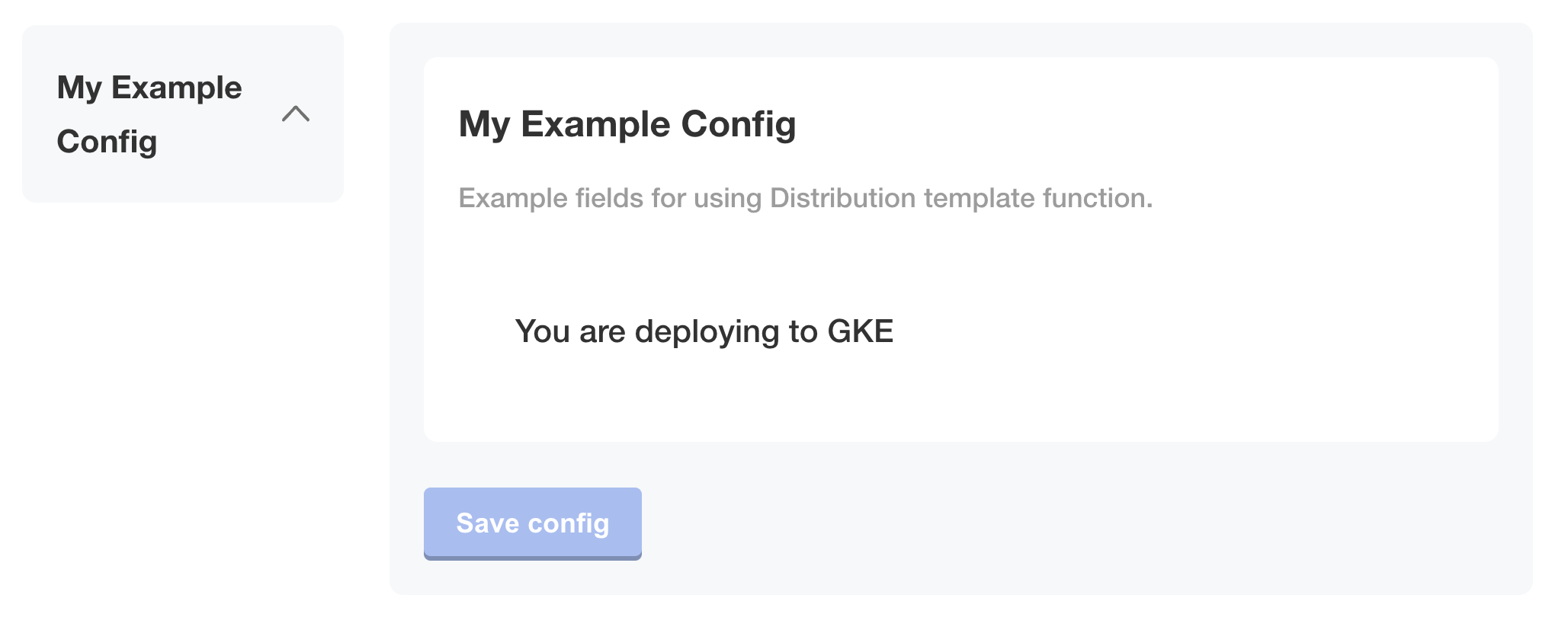
The following image shows how only the `gke_distribution` item is displayed on the **Config** page when KOTS is running in a GKE cluster:
 ### Embedded Cluster distribution check
It can be useful to show or hide configuration fields if the distribution of the cluster is [Replicated Embedded Cluster](/vendor/embedded-overview) because you can include extensions in embedded cluster distributions to manage functionality such as ingress and storage. This means that embedded clusters frequently have fewer configuration options for the user.
In the example below, the `ingress_type` field is displayed on the **Config** page only when the distribution of the cluster is _not_ [Replicated Embedded Cluster](/vendor/embedded-overview). This ensures that only users deploying to their own existing cluster are able to select the method for ingress.
The following example uses:
* KOTS [Distribution](/reference/template-functions-static-context#distribution) template function to return the Kubernetes distribution of the cluster where KOTS is running
* [ne](https://pkg.go.dev/text/template#hdr-Functions) (_not equal_) Go binary operator to compare the rendered value of the Distribution template function to a string, then return `true` if the values are not equal to one another
```yaml
apiVersion: kots.io/v1beta1
kind: Config
metadata:
name: config
spec:
groups:
# Ingress settings
- name: ingress_settings
title: Ingress Settings
description: Configure Ingress
items:
- name: ingress_type
title: Ingress Type
help_text: |
Select how traffic will ingress to the appliction.
type: radio
items:
- name: ingress_controller
title: Ingress Controller
- name: load_balancer
title: Load Balancer
default: "ingress_controller"
required: true
when: 'repl{{ ne Distribution "embedded-cluster" }}'
# Database settings
- name: database_settings
title: Database
items:
- name: postgres_type
help_text: Would you like to use an embedded postgres instance, or connect to an external instance that you manage?
type: radio
title: Postgres
default: embedded_postgres
items:
- name: embedded_postgres
title: Embedded Postgres
- name: external_postgres
title: External Postgres
```
The following image shows how the `ingress_type` field is hidden when the distribution of the cluster is `embedded-cluster`. Only the `postgres_type` item is displayed:
### Embedded Cluster distribution check
It can be useful to show or hide configuration fields if the distribution of the cluster is [Replicated Embedded Cluster](/vendor/embedded-overview) because you can include extensions in embedded cluster distributions to manage functionality such as ingress and storage. This means that embedded clusters frequently have fewer configuration options for the user.
In the example below, the `ingress_type` field is displayed on the **Config** page only when the distribution of the cluster is _not_ [Replicated Embedded Cluster](/vendor/embedded-overview). This ensures that only users deploying to their own existing cluster are able to select the method for ingress.
The following example uses:
* KOTS [Distribution](/reference/template-functions-static-context#distribution) template function to return the Kubernetes distribution of the cluster where KOTS is running
* [ne](https://pkg.go.dev/text/template#hdr-Functions) (_not equal_) Go binary operator to compare the rendered value of the Distribution template function to a string, then return `true` if the values are not equal to one another
```yaml
apiVersion: kots.io/v1beta1
kind: Config
metadata:
name: config
spec:
groups:
# Ingress settings
- name: ingress_settings
title: Ingress Settings
description: Configure Ingress
items:
- name: ingress_type
title: Ingress Type
help_text: |
Select how traffic will ingress to the appliction.
type: radio
items:
- name: ingress_controller
title: Ingress Controller
- name: load_balancer
title: Load Balancer
default: "ingress_controller"
required: true
when: 'repl{{ ne Distribution "embedded-cluster" }}'
# Database settings
- name: database_settings
title: Database
items:
- name: postgres_type
help_text: Would you like to use an embedded postgres instance, or connect to an external instance that you manage?
type: radio
title: Postgres
default: embedded_postgres
items:
- name: embedded_postgres
title: Embedded Postgres
- name: external_postgres
title: External Postgres
```
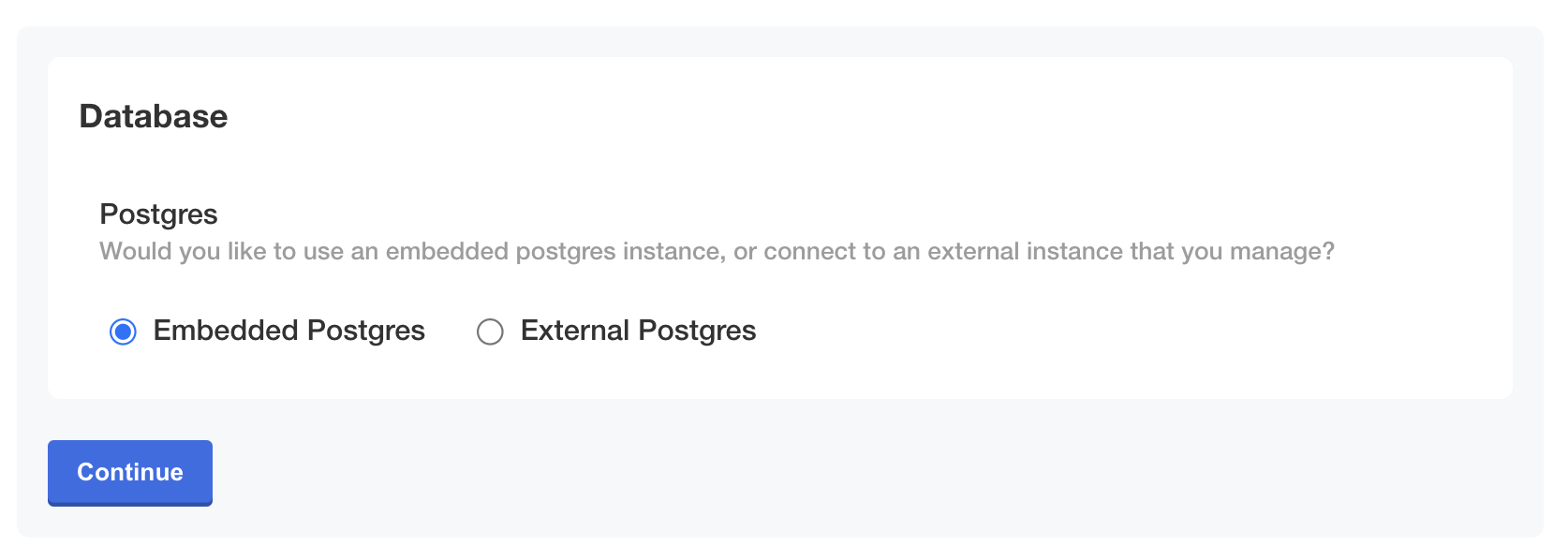
The following image shows how the `ingress_type` field is hidden when the distribution of the cluster is `embedded-cluster`. Only the `postgres_type` item is displayed:
 [View a larger version of this image](/images/config-example-distribution-not-ec.png)
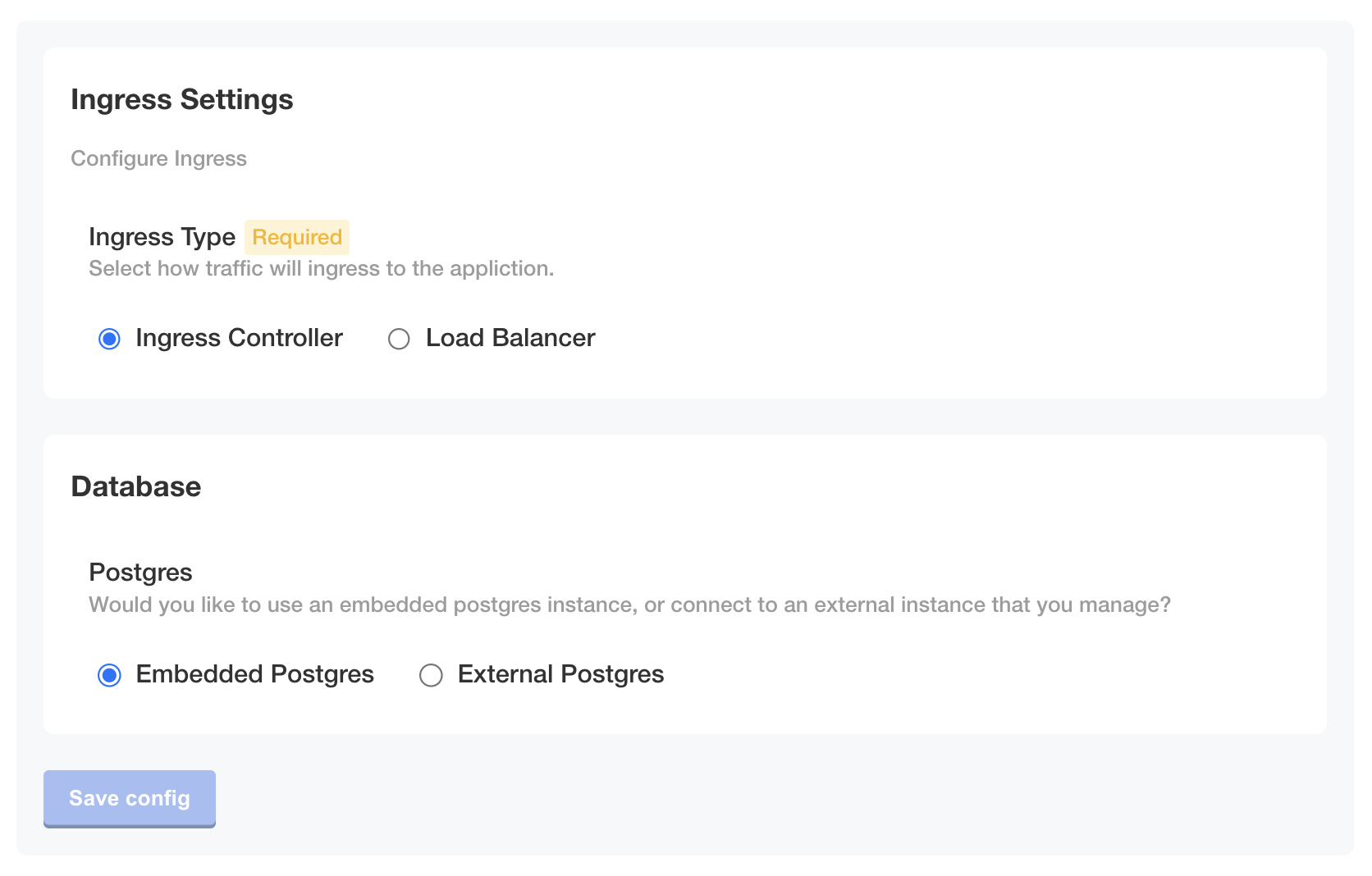
Conversely, when the distribution of the cluster is not `embedded-cluster`, both fields are displayed:
[View a larger version of this image](/images/config-example-distribution-not-ec.png)
Conversely, when the distribution of the cluster is not `embedded-cluster`, both fields are displayed:
 [View a larger version of this image](/images/config-example-distribution-not-ec-2.png)
### kURL distribution check
It can be useful to show or hide configuration fields if the cluster was provisioned by Replicated kURL because kURL distributions often include add-ons to manage functionality such as ingress and storage. This means that kURL clusters frequently have fewer configuration options for the user.
In the following example, the `when` property of the `not_kurl` group uses the IsKurl template function to evaluate if the cluster was provisioned by kURL. For more information about the IsKurl template function, see [IsKurl](/reference/template-functions-static-context#iskurl) in _Static Context_.
```yaml
# Config custom resource
apiVersion: kots.io/v1beta1
kind: Config
metadata:
name: config-sample
spec:
groups:
- name: all_distributions
title: Example Group
description: This group always displays.
items:
- name: example_item
title: This item always displays.
type: text
- name: not_kurl
title: Non-kURL Cluster Group
description: This group displays only if the cluster is not provisioned by kURL.
when: 'repl{{ not IsKurl }}'
items:
- name: example_item_non_kurl
title: The cluster is not provisioned by kURL.
type: label
```
As shown in the image below, both the `all_distributions` and `non_kurl` groups are displayed on the **Config** page when KOTS is _not_ running in a kURL cluster:

[View a larger version of this image](/images/config-example-iskurl-false.png)
However, when KOTS is running in a kURL cluster, only the `all_distributions` group is displayed, as shown below:

[View a larger version of this image](/images/config-example-iskurl-true.png)
### License field value equality check
You can show or hide configuration fields based on the values in a license to ensure that users only see configuration options for the features and entitlements granted by their license.
In the following example, the `when` property of the `new_feature_config` item uses the LicenseFieldValue template function to determine if the user's license contains a `newFeatureEntitlement` field that is set to `true`. For more information about the LicenseFieldValue template function, see [LicenseFieldValue](/reference/template-functions-license-context#licensefieldvalue) in _License Context_.
```yaml
apiVersion: kots.io/v1beta1
kind: Config
metadata:
name: config-sample
spec:
groups:
- name: example_settings
title: My Example Config
description: Example fields for using LicenseFieldValue template function
items:
- name: new_feature_config
type: label
title: "You have the new feature entitlement"
when: '{{repl (LicenseFieldValue "newFeatureEntitlement") }}'
```
As shown in the image below, the **Config** page displays the `new_feature_config` item when the user's license contains `newFeatureEntitlement: true`:

[View a larger version of this image](/images/config-example-newfeature.png)
### License field value integer comparison
You can show or hide configuration fields based on the values in a license to ensure that users only see configuration options for the features and entitlements granted by their license. You can also compare integer values from license fields to control the configuration experience for your users.
The following example uses:
* KOTS [LicenseFieldValue](/reference/template-functions-license-context#licensefieldvalue) template function to evaluate the number of seats permitted by the license
* Sprig [atoi](https://masterminds.github.io/sprig/conversion.html) function to convert the string values returned by LicenseFieldValue to integers
* [Go binary comparison operators](https://pkg.go.dev/text/template#hdr-Functions) `gt`, `lt`, `ge`, and `le` to compare the integers
```yaml
# KOTS Config custom resource
apiVersion: kots.io/v1beta1
kind: Config
metadata:
name: config-sample
spec:
groups:
- name: example_group
title: Example Config
items:
- name: small
title: Small (100 or Fewer Seats)
type: text
default: Default for small teams
# Use le and atoi functions to display this config item
# only when the value of the numSeats entitlement is
# less than or equal to 100
when: repl{{ le (atoi (LicenseFieldValue "numSeats")) 100 }}
- name: medium
title: Medium (101-1000 Seats)
type: text
default: Default for medium teams
# Use ge, le, and atoi functions to display this config item
# only when the value of the numSeats entitlement is
# greater than or equal to 101 and less than or equal to 1000
when: repl{{ (and (ge (atoi (LicenseFieldValue "numSeats")) 101) (le (atoi (LicenseFieldValue "numSeats")) 1000)) }}
- name: large
title: Large (More Than 1000 Seats)
type: text
default: Default for large teams
# Use gt and atoi functions to display this config item
# only when the value of the numSeats entitlement is
# greater than 1000
when: repl{{ gt (atoi (LicenseFieldValue "numSeats")) 1000 }}
```
As shown in the image below, if the user's license contains `numSeats: 150`, then the `medium` item is displayed on the **Config** page and the `small` and `large` items are not displayed:
[View a larger version of this image](/images/config-example-distribution-not-ec-2.png)
### kURL distribution check
It can be useful to show or hide configuration fields if the cluster was provisioned by Replicated kURL because kURL distributions often include add-ons to manage functionality such as ingress and storage. This means that kURL clusters frequently have fewer configuration options for the user.
In the following example, the `when` property of the `not_kurl` group uses the IsKurl template function to evaluate if the cluster was provisioned by kURL. For more information about the IsKurl template function, see [IsKurl](/reference/template-functions-static-context#iskurl) in _Static Context_.
```yaml
# Config custom resource
apiVersion: kots.io/v1beta1
kind: Config
metadata:
name: config-sample
spec:
groups:
- name: all_distributions
title: Example Group
description: This group always displays.
items:
- name: example_item
title: This item always displays.
type: text
- name: not_kurl
title: Non-kURL Cluster Group
description: This group displays only if the cluster is not provisioned by kURL.
when: 'repl{{ not IsKurl }}'
items:
- name: example_item_non_kurl
title: The cluster is not provisioned by kURL.
type: label
```
As shown in the image below, both the `all_distributions` and `non_kurl` groups are displayed on the **Config** page when KOTS is _not_ running in a kURL cluster:

[View a larger version of this image](/images/config-example-iskurl-false.png)
However, when KOTS is running in a kURL cluster, only the `all_distributions` group is displayed, as shown below:

[View a larger version of this image](/images/config-example-iskurl-true.png)
### License field value equality check
You can show or hide configuration fields based on the values in a license to ensure that users only see configuration options for the features and entitlements granted by their license.
In the following example, the `when` property of the `new_feature_config` item uses the LicenseFieldValue template function to determine if the user's license contains a `newFeatureEntitlement` field that is set to `true`. For more information about the LicenseFieldValue template function, see [LicenseFieldValue](/reference/template-functions-license-context#licensefieldvalue) in _License Context_.
```yaml
apiVersion: kots.io/v1beta1
kind: Config
metadata:
name: config-sample
spec:
groups:
- name: example_settings
title: My Example Config
description: Example fields for using LicenseFieldValue template function
items:
- name: new_feature_config
type: label
title: "You have the new feature entitlement"
when: '{{repl (LicenseFieldValue "newFeatureEntitlement") }}'
```
As shown in the image below, the **Config** page displays the `new_feature_config` item when the user's license contains `newFeatureEntitlement: true`:

[View a larger version of this image](/images/config-example-newfeature.png)
### License field value integer comparison
You can show or hide configuration fields based on the values in a license to ensure that users only see configuration options for the features and entitlements granted by their license. You can also compare integer values from license fields to control the configuration experience for your users.
The following example uses:
* KOTS [LicenseFieldValue](/reference/template-functions-license-context#licensefieldvalue) template function to evaluate the number of seats permitted by the license
* Sprig [atoi](https://masterminds.github.io/sprig/conversion.html) function to convert the string values returned by LicenseFieldValue to integers
* [Go binary comparison operators](https://pkg.go.dev/text/template#hdr-Functions) `gt`, `lt`, `ge`, and `le` to compare the integers
```yaml
# KOTS Config custom resource
apiVersion: kots.io/v1beta1
kind: Config
metadata:
name: config-sample
spec:
groups:
- name: example_group
title: Example Config
items:
- name: small
title: Small (100 or Fewer Seats)
type: text
default: Default for small teams
# Use le and atoi functions to display this config item
# only when the value of the numSeats entitlement is
# less than or equal to 100
when: repl{{ le (atoi (LicenseFieldValue "numSeats")) 100 }}
- name: medium
title: Medium (101-1000 Seats)
type: text
default: Default for medium teams
# Use ge, le, and atoi functions to display this config item
# only when the value of the numSeats entitlement is
# greater than or equal to 101 and less than or equal to 1000
when: repl{{ (and (ge (atoi (LicenseFieldValue "numSeats")) 101) (le (atoi (LicenseFieldValue "numSeats")) 1000)) }}
- name: large
title: Large (More Than 1000 Seats)
type: text
default: Default for large teams
# Use gt and atoi functions to display this config item
# only when the value of the numSeats entitlement is
# greater than 1000
when: repl{{ gt (atoi (LicenseFieldValue "numSeats")) 1000 }}
```
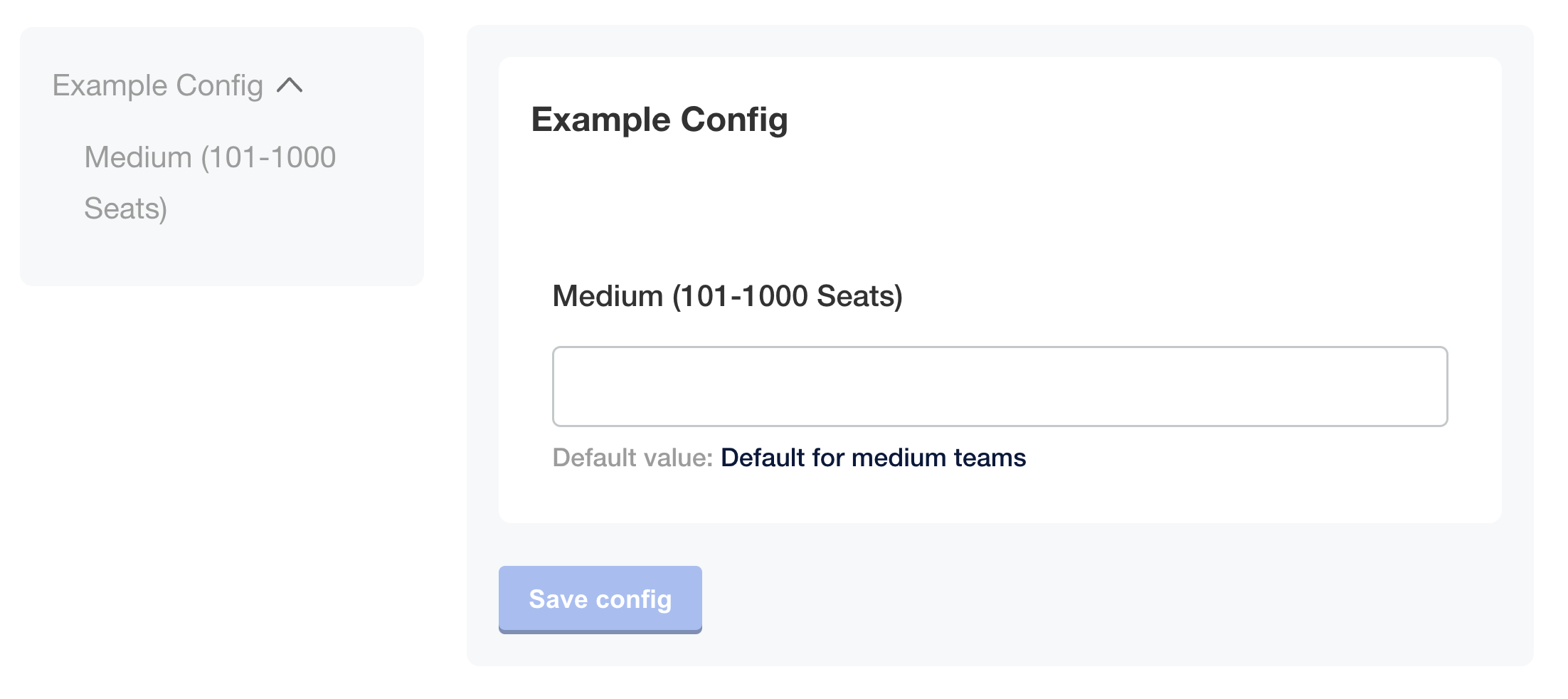
As shown in the image below, if the user's license contains `numSeats: 150`, then the `medium` item is displayed on the **Config** page and the `small` and `large` items are not displayed:
 [View a larger version of this image](/images/config-example-numseats.png)
### User-supplied value check
You can show or hide configuration fields based on user-supplied values on the **Config** page to ensure that users only see options that are relevant to their selections.
In the following example, the `database_host` and `database_passwords` items use the ConfigOptionEquals template function to evaluate if the user selected the `external` database option for the `db_type` item. For more information about the ConfigOptionEquals template function, see [ConfigOptionEquals](/reference/template-functions-config-context#configoptionequals) in _Config Context_.
```yaml
apiVersion: kots.io/v1beta1
kind: Config
metadata:
name: config-sample
spec:
groups:
- name: database_settings_group
title: Database Settings
items:
- name: db_type
title: Database Type
type: radio
default: external
items:
- name: external
title: External Database
- name: embedded
title: Embedded Database
- name: database_host
title: Database Hostname
type: text
when: '{{repl (ConfigOptionEquals "db_type" "external")}}'
- name: database_password
title: Database Password
type: password
when: '{{repl (ConfigOptionEquals "db_type" "external")}}'
```
As shown in the images below, when the user selects the external database option, the `database_host` and `database_passwords` items are displayed. Alternatively, when the user selects the embedded database option, the items are _not_ displayed:

[View a larger version of this image](/images/config-example-external-db.png)

[View a larger version of this image](/images/config-example-embedded-db.png)
## Use multiple conditions in the `when` property
You can use more than one template function in the `when` property to create more complex conditional statements. This allows you to show or hide configuration fields based on multiple conditions being true.
The following example includes `when` properties that use both the ConfigOptionEquals and IsKurl template functions:
```yaml
apiVersion: kots.io/v1beta1
kind: Config
metadata:
name: config-sample
spec:
groups:
- name: ingress_settings
title: Ingress Settings
description: Configure Ingress
items:
- name: ingress_type
title: Ingress Type
help_text: |
Select how traffic will ingress to the appliction.
type: radio
items:
- name: ingress_controller
title: Ingress Controller
- name: load_balancer
title: Load Balancer
default: "ingress_controller"
required: true
when: 'repl{{ not IsKurl }}'
- name: ingress_host
title: Hostname
help_text: Hostname used to access the application.
type: text
default: "hostname.example.com"
required: true
when: 'repl{{ and (not IsKurl) (ConfigOptionEquals "ingress_type" "ingress_controller") }}'
- name: ingress_annotations
type: textarea
title: Ingress Annotations
help_text: See your ingress controller’s documentation for the required annotations.
when: 'repl{{ and (not IsKurl) (ConfigOptionEquals "ingress_type" "ingress_controller") }}'
- name: ingress_tls_type
title: Ingress TLS Type
type: radio
items:
- name: self_signed
title: Self Signed (Generate Self Signed Certificate)
- name: user_provided
title: User Provided (Upload a TLS Certificate and Key Pair)
required: true
default: self_signed
when: 'repl{{ and (not IsKurl) (ConfigOptionEquals "ingress_type" "ingress_controller") }}'
- name: ingress_tls_cert
title: TLS Cert
type: file
when: '{{repl and (ConfigOptionEquals "ingress_type" "ingress_controller") (ConfigOptionEquals "ingress_tls_type" "user_provided") }}'
required: true
- name: ingress_tls_key
title: TLS Key
type: file
when: '{{repl and (ConfigOptionEquals "ingress_type" "ingress_controller") (ConfigOptionEquals "ingress_tls_type" "user_provided") }}'
required: true
- name: load_balancer_port
title: Load Balancer Port
help_text: Port used to access the application through the Load Balancer.
type: text
default: "443"
required: true
when: 'repl{{ and (not IsKurl) (ConfigOptionEquals "ingress_type" "load_balancer") }}'
- name: load_balancer_annotations
type: textarea
title: Load Balancer Annotations
help_text: See your cloud provider’s documentation for the required annotations.
when: 'repl{{ and (not IsKurl) (ConfigOptionEquals "ingress_type" "load_balancer") }}'
```
As shown in the image below, the configuration fields that are specific to the ingress controller display only when the user selects the ingress controller option and KOTS is _not_ running in a kURL cluster:

[View a larger version of this image](/images/config-example-ingress-controller.png)
Additionally, the options relevant to the load balancer display when the user selects the load balancer option and KOTS is _not_ running in a kURL cluster:

[View a larger version of this image](/images/config-example-ingress-load-balancer.png)
[View a larger version of this image](/images/config-example-numseats.png)
### User-supplied value check
You can show or hide configuration fields based on user-supplied values on the **Config** page to ensure that users only see options that are relevant to their selections.
In the following example, the `database_host` and `database_passwords` items use the ConfigOptionEquals template function to evaluate if the user selected the `external` database option for the `db_type` item. For more information about the ConfigOptionEquals template function, see [ConfigOptionEquals](/reference/template-functions-config-context#configoptionequals) in _Config Context_.
```yaml
apiVersion: kots.io/v1beta1
kind: Config
metadata:
name: config-sample
spec:
groups:
- name: database_settings_group
title: Database Settings
items:
- name: db_type
title: Database Type
type: radio
default: external
items:
- name: external
title: External Database
- name: embedded
title: Embedded Database
- name: database_host
title: Database Hostname
type: text
when: '{{repl (ConfigOptionEquals "db_type" "external")}}'
- name: database_password
title: Database Password
type: password
when: '{{repl (ConfigOptionEquals "db_type" "external")}}'
```
As shown in the images below, when the user selects the external database option, the `database_host` and `database_passwords` items are displayed. Alternatively, when the user selects the embedded database option, the items are _not_ displayed:

[View a larger version of this image](/images/config-example-external-db.png)

[View a larger version of this image](/images/config-example-embedded-db.png)
## Use multiple conditions in the `when` property
You can use more than one template function in the `when` property to create more complex conditional statements. This allows you to show or hide configuration fields based on multiple conditions being true.
The following example includes `when` properties that use both the ConfigOptionEquals and IsKurl template functions:
```yaml
apiVersion: kots.io/v1beta1
kind: Config
metadata:
name: config-sample
spec:
groups:
- name: ingress_settings
title: Ingress Settings
description: Configure Ingress
items:
- name: ingress_type
title: Ingress Type
help_text: |
Select how traffic will ingress to the appliction.
type: radio
items:
- name: ingress_controller
title: Ingress Controller
- name: load_balancer
title: Load Balancer
default: "ingress_controller"
required: true
when: 'repl{{ not IsKurl }}'
- name: ingress_host
title: Hostname
help_text: Hostname used to access the application.
type: text
default: "hostname.example.com"
required: true
when: 'repl{{ and (not IsKurl) (ConfigOptionEquals "ingress_type" "ingress_controller") }}'
- name: ingress_annotations
type: textarea
title: Ingress Annotations
help_text: See your ingress controller’s documentation for the required annotations.
when: 'repl{{ and (not IsKurl) (ConfigOptionEquals "ingress_type" "ingress_controller") }}'
- name: ingress_tls_type
title: Ingress TLS Type
type: radio
items:
- name: self_signed
title: Self Signed (Generate Self Signed Certificate)
- name: user_provided
title: User Provided (Upload a TLS Certificate and Key Pair)
required: true
default: self_signed
when: 'repl{{ and (not IsKurl) (ConfigOptionEquals "ingress_type" "ingress_controller") }}'
- name: ingress_tls_cert
title: TLS Cert
type: file
when: '{{repl and (ConfigOptionEquals "ingress_type" "ingress_controller") (ConfigOptionEquals "ingress_tls_type" "user_provided") }}'
required: true
- name: ingress_tls_key
title: TLS Key
type: file
when: '{{repl and (ConfigOptionEquals "ingress_type" "ingress_controller") (ConfigOptionEquals "ingress_tls_type" "user_provided") }}'
required: true
- name: load_balancer_port
title: Load Balancer Port
help_text: Port used to access the application through the Load Balancer.
type: text
default: "443"
required: true
when: 'repl{{ and (not IsKurl) (ConfigOptionEquals "ingress_type" "load_balancer") }}'
- name: load_balancer_annotations
type: textarea
title: Load Balancer Annotations
help_text: See your cloud provider’s documentation for the required annotations.
when: 'repl{{ and (not IsKurl) (ConfigOptionEquals "ingress_type" "load_balancer") }}'
```
As shown in the image below, the configuration fields that are specific to the ingress controller display only when the user selects the ingress controller option and KOTS is _not_ running in a kURL cluster:

[View a larger version of this image](/images/config-example-ingress-controller.png)
Additionally, the options relevant to the load balancer display when the user selects the load balancer option and KOTS is _not_ running in a kURL cluster:

[View a larger version of this image](/images/config-example-ingress-load-balancer.png)