# About Helm installations with Replicated
This topic provides an introduction to Helm installations for applications distributed with Replicated.
## Overview
Helm is a popular open source package manager for Kubernetes applications. Many ISVs use Helm to configure and deploy Kubernetes applications because it provides a consistent, reusable, and sharable packaging format. For more information, see the [Helm documentation](https://helm.sh/docs).
Replicated strongly recommends that all applications are packaged using Helm because many enterprise users expect to be able to install an application with the Helm CLI.
Existing releases in the Replicated Platform that already support installation with Replicated KOTS and Replicated Embedded Cluster (and that include one or more Helm charts) can also be installed with the Helm CLI; it is not necessary to create and manage separate releases or channels for each installation method.
For information about how to install with Helm, see:
* [Installing with Helm](/vendor/install-with-helm)
* [Installing and Updating with Helm in Air Gap Environments](helm-install-airgap)
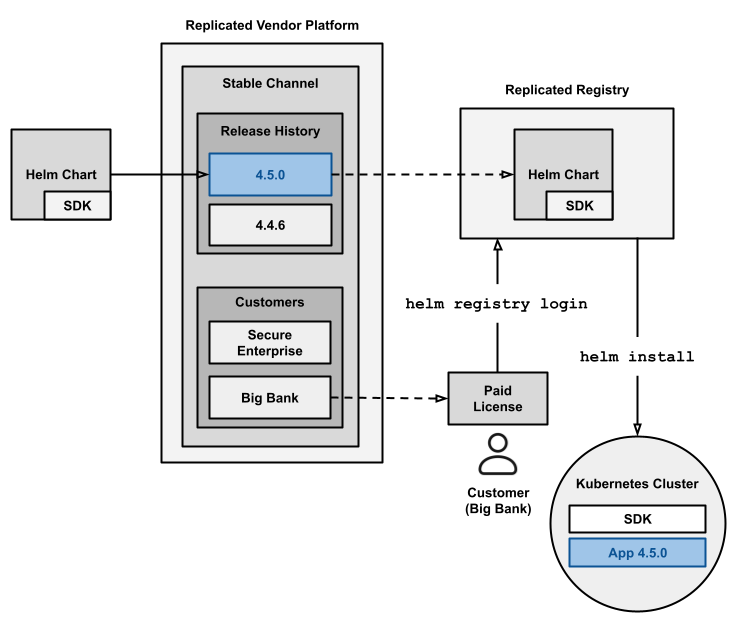
The following diagram shows how Helm charts distributed with Replicated are installed with Helm in online (internet-connected) customer environments:
 [View a larger version of this image](/images/helm-install-diagram.png)
As shown in the diagram above, when a release containing one or more Helm charts is promoted to a channel, the Replicated Vendor Portal automatically extracts any Helm charts included in the release. These charts are pushed as OCI objects to the Replicated registry. The Replicated registry is a private OCI registry hosted by Replicated at `registry.replicated.com`. For information about security for the Replicated registry, see [Replicated Registry Security](packaging-private-registry-security).
For example, if your application in the Vendor Portal is named My App and you promote a release containing a Helm chart with `name: my-chart` to a channel with the slug `beta`, then the Vendor Portal pushes the chart to the following location: `oci://registry.replicated.com/my-app/beta/my-chart`.
Customers can install your Helm chart by first logging in to the Replicated registry with their unique license ID. This step ensures that any customer who installs your chart from the registry has a valid, unexpired license. After the customer logs in to the Replicated registry, they can run `helm install` to install the chart from the registry.
When an authenticated user pulls a Helm chart from the Replicated registry (with `helm pull`, `helm install`, or `helm upgrade`, or from any OCI-compatible client), the Replicated registry injects customer-specific values into the `global.replicated` key of the chart's `values.yaml` file before serving the chart. For more information about the values schema, see [Helm global.replicated Values Schema](helm-install-values-schema).
## Limitations
* Helm CLI installations do not provide access to any of the features of the Replicated installers (Embedded Cluster, KOTS, kURL), such as:
* The Replicated Admin Console
* Strict preflight checks that block installation
* Backup and restore functionality powered by Velero
* Required releases with the **Prevent this release from being skipped during upgrades** option
*
For more information about the `global.replicated` values injected by the Replicated registry, see [Helm global.replicated Values Schema](helm-install-values-schema).
[View a larger version of this image](/images/helm-install-diagram.png)
As shown in the diagram above, when a release containing one or more Helm charts is promoted to a channel, the Replicated Vendor Portal automatically extracts any Helm charts included in the release. These charts are pushed as OCI objects to the Replicated registry. The Replicated registry is a private OCI registry hosted by Replicated at `registry.replicated.com`. For information about security for the Replicated registry, see [Replicated Registry Security](packaging-private-registry-security).
For example, if your application in the Vendor Portal is named My App and you promote a release containing a Helm chart with `name: my-chart` to a channel with the slug `beta`, then the Vendor Portal pushes the chart to the following location: `oci://registry.replicated.com/my-app/beta/my-chart`.
Customers can install your Helm chart by first logging in to the Replicated registry with their unique license ID. This step ensures that any customer who installs your chart from the registry has a valid, unexpired license. After the customer logs in to the Replicated registry, they can run `helm install` to install the chart from the registry.
When an authenticated user pulls a Helm chart from the Replicated registry (with `helm pull`, `helm install`, or `helm upgrade`, or from any OCI-compatible client), the Replicated registry injects customer-specific values into the `global.replicated` key of the chart's `values.yaml` file before serving the chart. For more information about the values schema, see [Helm global.replicated Values Schema](helm-install-values-schema).
## Limitations
* Helm CLI installations do not provide access to any of the features of the Replicated installers (Embedded Cluster, KOTS, kURL), such as:
* The Replicated Admin Console
* Strict preflight checks that block installation
* Backup and restore functionality powered by Velero
* Required releases with the **Prevent this release from being skipped during upgrades** option
*
For more information about the `global.replicated` values injected by the Replicated registry, see [Helm global.replicated Values Schema](helm-install-values-schema).