# About distributing Helm charts with KOTS
This topic provides an overview of how Replicated KOTS deploys Helm charts, including an introduction to the KOTS HelmChart custom resource, limitations of deploying Helm charts with KOTS, and more.
## Overview
Helm is a popular open source package manager for Kubernetes applications. Many ISVs use Helm to configure and deploy Kubernetes applications because it provides a consistent, reusable, and sharable packaging format. For more information, see the [Helm documentation](https://helm.sh/docs).
KOTS can install applications that include:
* One or more Helm charts
* More than a single instance of any chart
* A combination of Helm charts and Kubernetes manifests
Replicated strongly recommends that all applications are packaged as Helm charts because many enterprise users expect to be able to install an application with the Helm CLI.
Deploying Helm charts with KOTS provides additional functionality not directly available with the Helm CLI, such as:
* The KOTS Admin Console
* Backup and restore with snapshots
* Support for air gap installations
* Support for embedded cluster installations on VMs or bare metal servers
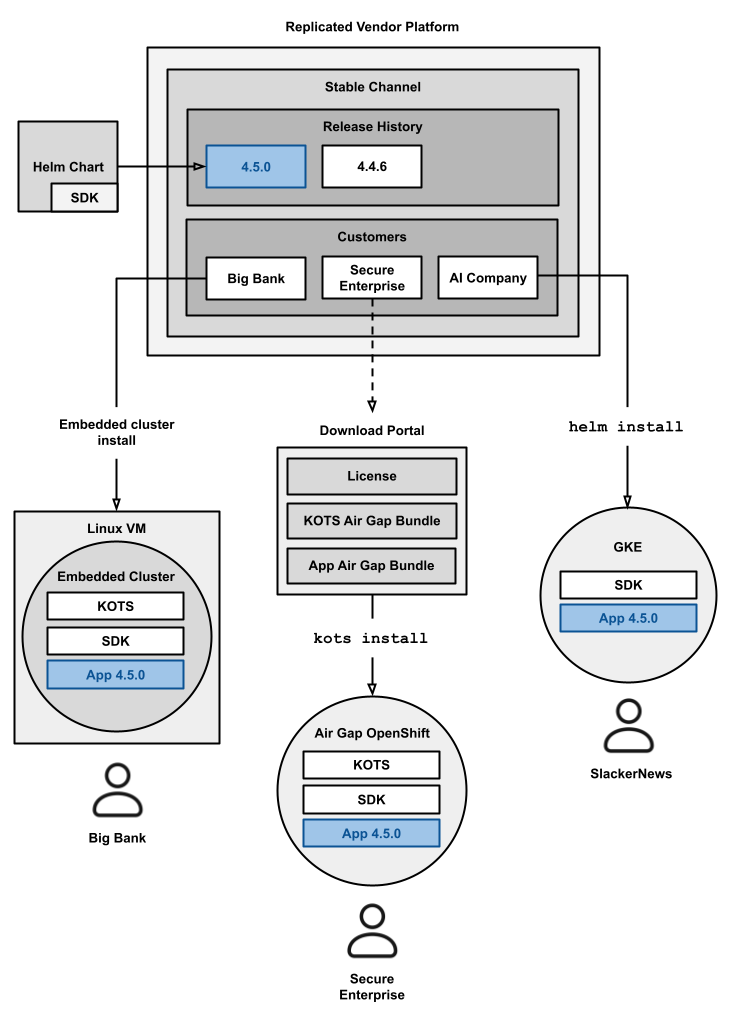
Additionally, for applications packaged as Helm charts, you can support Helm CLI and KOTS installations from the same release without having to maintain separate sets of Helm charts and application manifests. The following diagram demonstrates how a single release containing one or more Helm charts can be installed using the Helm CLI and KOTS:
 [View a larger version of this image](/images/helm-kots-install-options.png)
## How KOTS deploys Helm charts
This section describes how KOTS uses the HelmChart custom resource to deploy Helm charts.
### About the HelmChart custom resource
For installations with a Replicated installer (Embedded Cluster, KOTS, kURL), a unique HelmChart custom resource is required for each Helm chart `.tgz` archive in a release. The primary purpose of the HelmChart custom resource is to provide the necessary instructions to the Replicated installer for processing and preparing the given Helm chart for deployment.
The HelmChart custom resource is also used to generate a list of required images for the chart, which is required for the following use cases:
* Air gap installations with the Helm CLI or with a Replicated installer
* Online installations with a Replicated installer where the user will push images to a local image registry
* Online or air gap installations that use the [Security Center (Alpha)](/vendor/security-center-about) to scan and report on Helm chart images
The HelmChart custom resource with `apiVersion: kots.io/v1beta2` (HelmChart v2) is supported with KOTS v1.99.0 and later. For more information, see [About the HelmChart kots.io/v1beta2 Installation Method](#v2-install) below.
KOTS versions earlier than v1.99.0 can install Helm charts with `apiVersion: kots.io/v1beta1` of the HelmChart custom resource. The `kots.io/v1beta1` HelmChart custom resource is deprecated. For more information, see [Deprecated HelmChart kots.io/v1beta1 Installation Methods](#deprecated-helmchart-kotsiov1beta1-installation-methods) below.
### About the HelmChart v2 installation method {#v2-install}
When you include a HelmChart custom resource with `apiVersion: kots.io/v1beta2` in a release, KOTS v1.99.0 or later does a Helm install or upgrade of the associated Helm chart directly.
The `kots.io/v1beta2` HelmChart custom resource does _not_ modify the chart during installation. This results in Helm chart installations that are consistent, reliable, and easy to troubleshoot. For example, you can reproduce the exact installation outside of KOTS by downloading a copy of the application files from the cluster with `kots download`, then using those files to install with `helm install`. And, you can use `helm get values` to view the values that were used to install.
The `kots.io/v1beta2` HelmChart custom resource requires configuration. For more information, see [Configure the HelmChart Custom Resource v2](helm-native-v2-using).
For information about the fields and syntax of the HelmChart custom resource, see [HelmChart v2](/reference/custom-resource-helmchart-v2).
### Limitations
The following limitations apply when deploying Helm charts with the `kots.io/v1beta2` HelmChart custom resource:
* Available only for Helm v3.
* Available only for KOTS v1.99.0 and later.
* The rendered manifests shown in the `rendered` directory might not reflect the final manifests that will be deployed to the cluster. This is because the manifests in the `rendered` directory are generated using `helm template`, which is not run with cluster context. So values returned by the `lookup` function and the built-in `Capabilities` object might differ.
* When updating the HelmChart custom resource in a release from `kots.io/v1beta1` to `kots.io/v1beta2`, the diff viewer shows a large diff because the underlying file structure of the rendered manifests is different.
* Editing downstream Kustomization files to make changes to the application before deploying is not supported. This is because KOTS does not use Kustomize when installing Helm charts with the `kots.io/v1beta2` HelmChart custom resource. For more information about patching applications with Kustomize, see [Patch with Kustomize](/enterprise/updating-patching-with-kustomize).
*
:::important
KOTS Auto-GitOps is a legacy feature and is **not recommended** for use. For modern enterprise customers that prefer software deployment processes that use CI/CD pipelines, Replicated recommends the [Helm CLI installation method](/vendor/install-with-helm), which is more commonly used in these types of enterprise environments.
:::
For more information, see [KOTS Auto-GitOps Workflow](/enterprise/gitops-workflow).
## Support for Helm hooks {#hooks}
KOTS supports the following hooks for Helm charts:
* `pre-install`: Executes after resources are rendered but before any resources are installed.
* `post-install`: Executes after resources are installed.
* `pre-upgrade`: Executes after resources are rendered but before any resources are upgraded.
* `post-upgrade`: Executes after resources are upgraded.
* `pre-delete`: Executes before any resources are deleted.
* `post-delete`: Executes after resources are deleted.
The following limitations apply to using hooks with Helm charts deployed by KOTS:
*
*
For more information about Helm hooks, see [Chart Hooks](https://helm.sh/docs/topics/charts_hooks/) in the Helm documentation.
## Air gap installations
KOTS supports installation of Helm charts into air gap environments with configuration of the HelmChart custom resource [`builder`](/reference/custom-resource-helmchart-v2#builder) key. The `builder` key specifies the Helm values to use when building the air gap bundle for the application.
For more information about how to configure the `builder` key to support air gap installations, see [Package Air Gap Bundles for Helm Charts](/vendor/helm-packaging-airgap-bundles).
## Resource deployment order
When installing an application that includes one or more Helm charts, KOTS always deploys standard Kubernetes manifests to the cluster _before_ deploying any Helm charts. For example, if your release contains a Helm chart, a CRD, and a ConfigMap, then the CRD and ConfigMap resources are deployed before the Helm chart.
For information about how to set the deployment order for Helm charts with KOTS, see [Orchestrate Resource Deployment](/vendor/orchestrating-resource-deployment).
## Deprecated HelmChart KOTS.io/v1beta1 installation methods
This section describes the deprecated Helm chart installation methods that use the HelmChart custom resource `apiVersion: kots.io/v1beta1`.
:::important
The HelmChart custom resource `apiVersion: kots.io/v1beta1` is deprecated. For installations with Replicated KOTS v1.99.0 and later, use the HelmChart custom resource with `apiVersion: kots.io/v1beta2` instead. See [HelmChart v2](/reference/custom-resource-helmchart-v2) and [Confguring the HelmChart Custom Resource v2](/vendor/helm-native-v2-using).
:::
### Usehelminstall: True {#v1beta1}
:::note
This method was previously referred to as _Native Helm_.
:::
When you include version `kots.io/v1beta1` of the HelmChart custom resource with `useHelmInstall: true`, KOTS uses Kustomize to render the chart with configuration values, license field values, and rewritten image names. KOTS then packages the resulting manifests into a new Helm chart to install. For more information about Kustomize, see the [Kustomize documentation](https://kubectl.docs.kubernetes.io/).
The following diagram shows how KOTS processes Helm charts for deployment with the `kots.io/v1beta1` method:

[View a larger image](/images/native-helm-flowchart.png)
As shown in the diagram above, when given a Helm chart, KOTS:
- Uses Kustomize to merge instructions from KOTS and the end user to chart resources (see steps 2 - 4 below)
- Packages the resulting manifest files into a new Helm chart (see step 5 below)
- Deploys the new Helm chart (see step 5 below)
To deploy Helm charts with version `kots.io/v1beta1` of the HelmChart custom resource, KOTS does the following:
1. **Checks for previous installations of the chart**: If the Helm chart has already been deployed with a HelmChart custom resource that has `useHelmInstall: false`, then KOTS does not attempt the install the chart. The following error message is displayed if this check fails: `Deployment method for chart has changed`. For more information, see [HelmChart kots.io/v1beta1 (useHelmInstall: false)](#v1beta1-false) below.
1. **Writes base files**: KOTS extracts Helm manifests, renders them with Replicated templating, and then adds all files from the original Helm tarball to a `base/charts/` directory.
Under `base/charts/`, KOTS adds a Kustomization file named `kustomization.yaml` in the directories for each chart and subchart. KOTS uses these Kustomization files later in the deployment process to merge instructions from Kustomize to the chart resources. For more information about Kustomize, see the [Kustomize website](https://kustomize.io).
The following screenshot from the Replicated Admin Console shows a `base/charts/` directory for a deployed application. The `base/charts/` directory contains a Helm chart named postgresql with one subchart:

In the screenshot above, a Kustomization file that targets the resources from the postgresql Helm chart appears in the `base/charts/postgresql/` directory:
```yaml
apiVersion: kustomize.config.k8s.io/v1beta1
kind: Kustomization
resources:
- secrets.yaml
- statefulset.yaml
- svc-headless.yaml
- svc.yaml
```
1. **Writes midstream files with Kustomize instructions from KOTS**: KOTS then copies the directory structure from `base/charts/` to an `overlays/midstream/charts/` directory. The following screenshot shows an example of the midstream directory for the postgresql Helm chart:

As shown in the screenshot above, the midstream directory also contains a Kustomization file with instructions from KOTS for all deployed resources, such as image pull secrets, image rewrites, and backup labels. For example, in the midstream Kustomization file, KOTS rewrites any private images to pull from the Replicated proxy registry.
The following shows an example of a midstream Kustomization file for the postgresql Helm chart:
```yaml
apiVersion: kustomize.config.k8s.io/v1beta1
bases:
- ../../../../base/charts/postgresql
commonAnnotations:
kots.io/app-slug: helm-test
images:
- name: gcr.io/replicated-qa/postgresql
newName: proxy.replicated.com/proxy/helm-test/gcr.io/replicated-qa/postgresql
kind: Kustomization
patchesStrategicMerge:
- pullsecrets.yaml
resources:
- secret.yaml
transformers:
- backup-label-transformer.yaml
```
As shown in the example above, all midstream Kustomization files have a `bases` entry that references the corresponding Kustomization file from the `base/charts/` directory.
1. **Writes downstream files for end user Kustomize instructions**: KOTS then creates an `overlays/downstream/this-cluster/charts` directory and again copies the directory structure of `base/charts/` to this downstream directory:

As shown in the screenshot above, each chart and subchart directory in the downstream directory also contains a Kustomization file. These downstream Kustomization files contain only a `bases` entry that references the corresponding Kustomization file from the midstream directory. For example:
```yaml
apiVersion: kustomize.config.k8s.io/v1beta1
bases:
- ../../../../midstream/charts/postgresql
kind: Kustomization
```
End users can edit the downstream Kustomization files to make changes before deploying the application. Any instructions that users add to the Kustomization files in the downstream directory take priority over midstream and base Kustomization files. For more information about how users can make changes before deploying, see [Patch with Kustomize](/enterprise/updating-patching-with-kustomize).
1. **Deploys the Helm chart**: KOTS runs `kustomize build` for any Kustomization files in the `overlays/downstream/charts` directory. KOTS then packages the resulting manifests into a new chart for Helm to consume.
Finally, KOTS runs `helm upgrade -i --timeout 3600s -n `. The Helm binary processes hooks and weights, applies manifests to the Kubernetes cluster, and saves a release secret similar to `sh.helm.release.v1.chart-name.v1`. Helm uses this secret to track upgrades and rollbacks of applications.
### Usehelminstall: False {#v1beta1-false}
:::note
This method was previously referred to as _Replicated Helm_.
:::
When you use version `kots.io/v1beta1` of HelmChart custom resource with `useHelmInstall: false`, KOTS renders the Helm templates and deploys them as standard Kubernetes manifests using `kubectl apply`. KOTS also has additional functionality for specific Helm hooks. For example, when KOTS encounters an upstream Helm chart with a `helm.sh/hook-delete-policy` annotation, it automatically adds the same `kots.io/hook-delete-policy` to the Job object.
The resulting deployment is comprised of standard Kubernetes manifests. Therefore, cluster operators can view the exact differences between what is currently deployed and what an update will deploy.
### Limitations {#replicated-helm-limitations}
This section lists the limitations for version `kots.io/v1beta1` of the HelmChart custom resource.
#### KOTS.io/v1beta1 (usehelminstall: True) Limitations
The following limitations apply when using version `kots.io/v1beta1` of the HelmChart custom resource with `useHelmInstall: true`:
*
* Available only for Helm V3.
*
For more information, see [KOTS Auto-GitOps Workflow](/enterprise/gitops-workflow).
*
*
*
*
For more information, see [helmVersion](/reference/custom-resource-helmchart#helmversion) in _HelmChart_.
#### KOTS.io/v1beta1 (usehelminstall: False) Limitations {#v1beta1-false-limitations}
The following limitations apply when using version `kots.io/v1beta1` of the HelmChart custom resource with `useHelmInstall: false`:
*
*
*
For more information, see [helmVersion](/reference/custom-resource-helmchart#helmversion) in _HelmChart_.
[View a larger version of this image](/images/helm-kots-install-options.png)
## How KOTS deploys Helm charts
This section describes how KOTS uses the HelmChart custom resource to deploy Helm charts.
### About the HelmChart custom resource
For installations with a Replicated installer (Embedded Cluster, KOTS, kURL), a unique HelmChart custom resource is required for each Helm chart `.tgz` archive in a release. The primary purpose of the HelmChart custom resource is to provide the necessary instructions to the Replicated installer for processing and preparing the given Helm chart for deployment.
The HelmChart custom resource is also used to generate a list of required images for the chart, which is required for the following use cases:
* Air gap installations with the Helm CLI or with a Replicated installer
* Online installations with a Replicated installer where the user will push images to a local image registry
* Online or air gap installations that use the [Security Center (Alpha)](/vendor/security-center-about) to scan and report on Helm chart images
The HelmChart custom resource with `apiVersion: kots.io/v1beta2` (HelmChart v2) is supported with KOTS v1.99.0 and later. For more information, see [About the HelmChart kots.io/v1beta2 Installation Method](#v2-install) below.
KOTS versions earlier than v1.99.0 can install Helm charts with `apiVersion: kots.io/v1beta1` of the HelmChart custom resource. The `kots.io/v1beta1` HelmChart custom resource is deprecated. For more information, see [Deprecated HelmChart kots.io/v1beta1 Installation Methods](#deprecated-helmchart-kotsiov1beta1-installation-methods) below.
### About the HelmChart v2 installation method {#v2-install}
When you include a HelmChart custom resource with `apiVersion: kots.io/v1beta2` in a release, KOTS v1.99.0 or later does a Helm install or upgrade of the associated Helm chart directly.
The `kots.io/v1beta2` HelmChart custom resource does _not_ modify the chart during installation. This results in Helm chart installations that are consistent, reliable, and easy to troubleshoot. For example, you can reproduce the exact installation outside of KOTS by downloading a copy of the application files from the cluster with `kots download`, then using those files to install with `helm install`. And, you can use `helm get values` to view the values that were used to install.
The `kots.io/v1beta2` HelmChart custom resource requires configuration. For more information, see [Configure the HelmChart Custom Resource v2](helm-native-v2-using).
For information about the fields and syntax of the HelmChart custom resource, see [HelmChart v2](/reference/custom-resource-helmchart-v2).
### Limitations
The following limitations apply when deploying Helm charts with the `kots.io/v1beta2` HelmChart custom resource:
* Available only for Helm v3.
* Available only for KOTS v1.99.0 and later.
* The rendered manifests shown in the `rendered` directory might not reflect the final manifests that will be deployed to the cluster. This is because the manifests in the `rendered` directory are generated using `helm template`, which is not run with cluster context. So values returned by the `lookup` function and the built-in `Capabilities` object might differ.
* When updating the HelmChart custom resource in a release from `kots.io/v1beta1` to `kots.io/v1beta2`, the diff viewer shows a large diff because the underlying file structure of the rendered manifests is different.
* Editing downstream Kustomization files to make changes to the application before deploying is not supported. This is because KOTS does not use Kustomize when installing Helm charts with the `kots.io/v1beta2` HelmChart custom resource. For more information about patching applications with Kustomize, see [Patch with Kustomize](/enterprise/updating-patching-with-kustomize).
*
:::important
KOTS Auto-GitOps is a legacy feature and is **not recommended** for use. For modern enterprise customers that prefer software deployment processes that use CI/CD pipelines, Replicated recommends the [Helm CLI installation method](/vendor/install-with-helm), which is more commonly used in these types of enterprise environments.
:::
For more information, see [KOTS Auto-GitOps Workflow](/enterprise/gitops-workflow).
## Support for Helm hooks {#hooks}
KOTS supports the following hooks for Helm charts:
* `pre-install`: Executes after resources are rendered but before any resources are installed.
* `post-install`: Executes after resources are installed.
* `pre-upgrade`: Executes after resources are rendered but before any resources are upgraded.
* `post-upgrade`: Executes after resources are upgraded.
* `pre-delete`: Executes before any resources are deleted.
* `post-delete`: Executes after resources are deleted.
The following limitations apply to using hooks with Helm charts deployed by KOTS:
*
*
For more information about Helm hooks, see [Chart Hooks](https://helm.sh/docs/topics/charts_hooks/) in the Helm documentation.
## Air gap installations
KOTS supports installation of Helm charts into air gap environments with configuration of the HelmChart custom resource [`builder`](/reference/custom-resource-helmchart-v2#builder) key. The `builder` key specifies the Helm values to use when building the air gap bundle for the application.
For more information about how to configure the `builder` key to support air gap installations, see [Package Air Gap Bundles for Helm Charts](/vendor/helm-packaging-airgap-bundles).
## Resource deployment order
When installing an application that includes one or more Helm charts, KOTS always deploys standard Kubernetes manifests to the cluster _before_ deploying any Helm charts. For example, if your release contains a Helm chart, a CRD, and a ConfigMap, then the CRD and ConfigMap resources are deployed before the Helm chart.
For information about how to set the deployment order for Helm charts with KOTS, see [Orchestrate Resource Deployment](/vendor/orchestrating-resource-deployment).
## Deprecated HelmChart KOTS.io/v1beta1 installation methods
This section describes the deprecated Helm chart installation methods that use the HelmChart custom resource `apiVersion: kots.io/v1beta1`.
:::important
The HelmChart custom resource `apiVersion: kots.io/v1beta1` is deprecated. For installations with Replicated KOTS v1.99.0 and later, use the HelmChart custom resource with `apiVersion: kots.io/v1beta2` instead. See [HelmChart v2](/reference/custom-resource-helmchart-v2) and [Confguring the HelmChart Custom Resource v2](/vendor/helm-native-v2-using).
:::
### Usehelminstall: True {#v1beta1}
:::note
This method was previously referred to as _Native Helm_.
:::
When you include version `kots.io/v1beta1` of the HelmChart custom resource with `useHelmInstall: true`, KOTS uses Kustomize to render the chart with configuration values, license field values, and rewritten image names. KOTS then packages the resulting manifests into a new Helm chart to install. For more information about Kustomize, see the [Kustomize documentation](https://kubectl.docs.kubernetes.io/).
The following diagram shows how KOTS processes Helm charts for deployment with the `kots.io/v1beta1` method:

[View a larger image](/images/native-helm-flowchart.png)
As shown in the diagram above, when given a Helm chart, KOTS:
- Uses Kustomize to merge instructions from KOTS and the end user to chart resources (see steps 2 - 4 below)
- Packages the resulting manifest files into a new Helm chart (see step 5 below)
- Deploys the new Helm chart (see step 5 below)
To deploy Helm charts with version `kots.io/v1beta1` of the HelmChart custom resource, KOTS does the following:
1. **Checks for previous installations of the chart**: If the Helm chart has already been deployed with a HelmChart custom resource that has `useHelmInstall: false`, then KOTS does not attempt the install the chart. The following error message is displayed if this check fails: `Deployment method for chart has changed`. For more information, see [HelmChart kots.io/v1beta1 (useHelmInstall: false)](#v1beta1-false) below.
1. **Writes base files**: KOTS extracts Helm manifests, renders them with Replicated templating, and then adds all files from the original Helm tarball to a `base/charts/` directory.
Under `base/charts/`, KOTS adds a Kustomization file named `kustomization.yaml` in the directories for each chart and subchart. KOTS uses these Kustomization files later in the deployment process to merge instructions from Kustomize to the chart resources. For more information about Kustomize, see the [Kustomize website](https://kustomize.io).
The following screenshot from the Replicated Admin Console shows a `base/charts/` directory for a deployed application. The `base/charts/` directory contains a Helm chart named postgresql with one subchart:

In the screenshot above, a Kustomization file that targets the resources from the postgresql Helm chart appears in the `base/charts/postgresql/` directory:
```yaml
apiVersion: kustomize.config.k8s.io/v1beta1
kind: Kustomization
resources:
- secrets.yaml
- statefulset.yaml
- svc-headless.yaml
- svc.yaml
```
1. **Writes midstream files with Kustomize instructions from KOTS**: KOTS then copies the directory structure from `base/charts/` to an `overlays/midstream/charts/` directory. The following screenshot shows an example of the midstream directory for the postgresql Helm chart:

As shown in the screenshot above, the midstream directory also contains a Kustomization file with instructions from KOTS for all deployed resources, such as image pull secrets, image rewrites, and backup labels. For example, in the midstream Kustomization file, KOTS rewrites any private images to pull from the Replicated proxy registry.
The following shows an example of a midstream Kustomization file for the postgresql Helm chart:
```yaml
apiVersion: kustomize.config.k8s.io/v1beta1
bases:
- ../../../../base/charts/postgresql
commonAnnotations:
kots.io/app-slug: helm-test
images:
- name: gcr.io/replicated-qa/postgresql
newName: proxy.replicated.com/proxy/helm-test/gcr.io/replicated-qa/postgresql
kind: Kustomization
patchesStrategicMerge:
- pullsecrets.yaml
resources:
- secret.yaml
transformers:
- backup-label-transformer.yaml
```
As shown in the example above, all midstream Kustomization files have a `bases` entry that references the corresponding Kustomization file from the `base/charts/` directory.
1. **Writes downstream files for end user Kustomize instructions**: KOTS then creates an `overlays/downstream/this-cluster/charts` directory and again copies the directory structure of `base/charts/` to this downstream directory:

As shown in the screenshot above, each chart and subchart directory in the downstream directory also contains a Kustomization file. These downstream Kustomization files contain only a `bases` entry that references the corresponding Kustomization file from the midstream directory. For example:
```yaml
apiVersion: kustomize.config.k8s.io/v1beta1
bases:
- ../../../../midstream/charts/postgresql
kind: Kustomization
```
End users can edit the downstream Kustomization files to make changes before deploying the application. Any instructions that users add to the Kustomization files in the downstream directory take priority over midstream and base Kustomization files. For more information about how users can make changes before deploying, see [Patch with Kustomize](/enterprise/updating-patching-with-kustomize).
1. **Deploys the Helm chart**: KOTS runs `kustomize build` for any Kustomization files in the `overlays/downstream/charts` directory. KOTS then packages the resulting manifests into a new chart for Helm to consume.
Finally, KOTS runs `helm upgrade -i --timeout 3600s -n `. The Helm binary processes hooks and weights, applies manifests to the Kubernetes cluster, and saves a release secret similar to `sh.helm.release.v1.chart-name.v1`. Helm uses this secret to track upgrades and rollbacks of applications.
### Usehelminstall: False {#v1beta1-false}
:::note
This method was previously referred to as _Replicated Helm_.
:::
When you use version `kots.io/v1beta1` of HelmChart custom resource with `useHelmInstall: false`, KOTS renders the Helm templates and deploys them as standard Kubernetes manifests using `kubectl apply`. KOTS also has additional functionality for specific Helm hooks. For example, when KOTS encounters an upstream Helm chart with a `helm.sh/hook-delete-policy` annotation, it automatically adds the same `kots.io/hook-delete-policy` to the Job object.
The resulting deployment is comprised of standard Kubernetes manifests. Therefore, cluster operators can view the exact differences between what is currently deployed and what an update will deploy.
### Limitations {#replicated-helm-limitations}
This section lists the limitations for version `kots.io/v1beta1` of the HelmChart custom resource.
#### KOTS.io/v1beta1 (usehelminstall: True) Limitations
The following limitations apply when using version `kots.io/v1beta1` of the HelmChart custom resource with `useHelmInstall: true`:
*
* Available only for Helm V3.
*
For more information, see [KOTS Auto-GitOps Workflow](/enterprise/gitops-workflow).
*
*
*
*
For more information, see [helmVersion](/reference/custom-resource-helmchart#helmversion) in _HelmChart_.
#### KOTS.io/v1beta1 (usehelminstall: False) Limitations {#v1beta1-false-limitations}
The following limitations apply when using version `kots.io/v1beta1` of the HelmChart custom resource with `useHelmInstall: false`:
*
*
*
For more information, see [helmVersion](/reference/custom-resource-helmchart#helmversion) in _HelmChart_.